




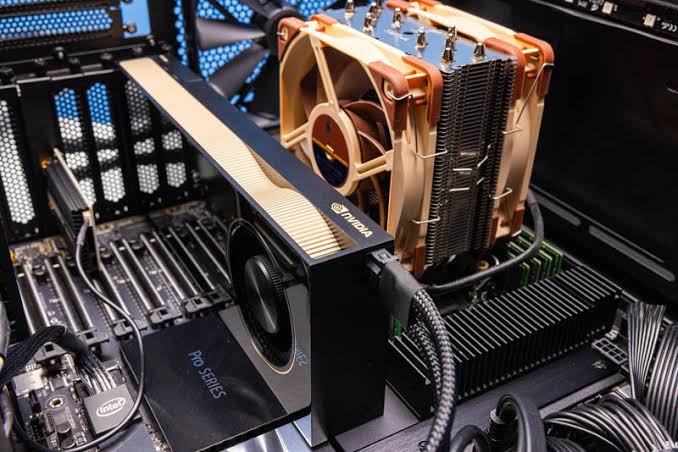
Creating realistic product visuals requires more than artistic skill and powerful design software. Every material, reflection, shadow, and surface detail depends on capable hardware working behind the scenes. Choosing the right workstation can transform slow rendering sessions into a smoother, more productive creative process. Understanding your hardware requirements helps you achieve professional results without overspending on unnecessary specifications.
Understanding Rendering Demands
A KeyShot Intel Ultra workstation can provide a strong foundation for designers who need dependable performance across modeling, visualization, and rendering tasks. However, the ideal configuration depends on project complexity and output resolution. Simple product images require fewer resources than detailed automotive scenes or intricate architectural visualizations. Evaluating these demands helps ensure your investment supports current projects and future growth.
KeyShot offers CPU-based and GPU-based rendering options, making hardware selection important. CPU rendering benefits from strong multicore performance, while GPU rendering can accelerate compatible workloads. Memory capacity, storage speed, and cooling also influence overall responsiveness. A balanced workstation allows artists to focus on producing accurate, visually compelling results.
Choosing Processor Power
The processor remains an important consideration for many rendering workflows, particularly when projects rely on CPU rendering. A modern CPU with multiple cores can handle demanding calculations efficiently, although performance varies by processor generation, architecture, and workload. Designers should compare real-world rendering benchmarks rather than relying exclusively on clock speeds or core counts when evaluating different systems.
For professionals handling several applications simultaneously, processor performance also affects everyday productivity. Opening large scenes, preparing assets, and switching between design tools can place additional demands on the system. Selecting a workstation with a capable processor and sufficient cooling helps maintain consistent performance during extended sessions. The goal is not simply to purchase the most expensive CPU, but to match processing capability to actual project requirements.
Evaluating Graphics Capabilities
A workstation equipped with a powerful graphics card is worth considering when compatible scenes can benefit from GPU acceleration. Modern GPUs offer substantial parallel processing resources, which can help shorten rendering times. However, performance depends on graphics architecture, video memory, and software compatibility. Checking KeyShot’s hardware requirements before choosing a graphics card is essential.
Graphics memory matters when working with complex geometry, detailed textures, and high-resolution environments. If a scene exceeds available GPU memory, performance may suffer, or rendering may become impractical. Consider the following factors when comparing graphics hardware:
- GPU memory: Choose capacity appropriate for scene complexity and texture requirements.
- Architecture: Compare current-generation cards using relevant rendering benchmarks.
- Compatibility: Verify support for your KeyShot version and required rendering features.
- Cooling: Look for designs that maintain stable performance under sustained workloads.
- Expandability: Consider future upgrades if project demands are likely to increase.
A suitable graphics card should support your actual workload rather than simply offer impressive specifications. Careful selection helps balance rendering speed, system cost, and long-term usability.
Planning System Memory
System RAM plays a critical role when scenes contain detailed models, large textures, or multiple imported assets. Insufficient memory can cause slowdowns or difficulties opening demanding projects. Many professionals benefit from starting with 32 GB and considering 64 GB or more for complex workloads.
Memory requirements increase when KeyShot runs alongside CAD applications and image editors. For a KeyShot GPU rendering workstation, sufficient system RAM complements graphics memory and supports smoother multitasking. Monitoring memory usage helps identify upgrade needs, while accessible memory slots simplify future expansion.
Improving Storage Performance
Fast storage contributes to a more responsive workstation, especially when managing substantial project files and extensive asset libraries. An NVMe solid-state drive can improve file access and loading compared with traditional hard drives, although it does not automatically make every rendering calculation faster. Its main advantages include quicker project transfers and a more responsive workflow.
Capacity matters just as much as speed for teams producing numerous variations and maintaining archived scenes. A practical setup might include a primary SSD for applications and active projects, supplemented by additional storage for completed work and backups. Organizing assets consistently and establishing a reliable backup routine helps protect valuable creative work.
Managing Cooling And Reliability
Rendering can keep processors and graphics cards under sustained load for extended periods. Without effective cooling, components may reduce their operating speeds to control temperatures, affecting performance. A well-designed workstation should provide sufficient airflow and appropriate cooling hardware.
Reliability also depends on the power supply, component quality, and maintenance. Choose a power supply that meets CPU and GPU requirements, allowing headroom for future upgrades. Regular cleaning and temperature monitoring help prevent avoidable problems. For professionals facing deadlines, dependable operation is just as valuable as peak rendering speed.
Conclusion
Successful rendering begins with understanding how hardware choices affect your creative workflow. A balanced combination of processing power, graphics capability, memory, and fast storage supports demanding visualization projects. By evaluating real workloads, ensuring reliable cooling, and planning for future upgrades, designers can make smarter investments. With the right hardware guidance from Cloud Ninjas, you can build a workstation that turns ambitious visual ideas into polished professional results.