



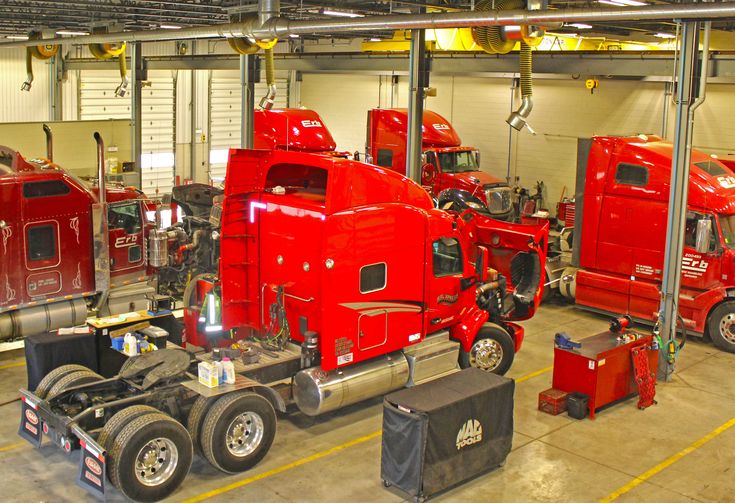
Truck repair shops handle complex maintenance tasks, customer requests, parts inventory, technician schedules, and service records every day. Managing these operations manually can create delays, increase administrative work, and make it difficult to track the progress of each repair. Truck repair shop software helps heavy-duty repair businesses organize daily operations, improve workflow efficiency, and maintain accurate service records from a centralized platform.
Whether you operate an independent diesel repair shop, a commercial truck service center, or a fleet maintenance facility, the right software can help you manage repairs more efficiently while delivering a better customer experience.
What Is Truck Repair Shop Software?
Truck repair shop software is a digital management solution designed to help repair facilities organize and automate their service operations. It combines essential business functions, including repair order management, technician scheduling, inventory tracking, estimates, invoicing, and customer communication.
Unlike general automotive repair tools, heavy-duty truck repair software can support the specific requirements of commercial vehicle maintenance. These include complex diagnostic procedures, multiple labor operations, recurring preventive maintenance, and detailed records for trucks, trailers, and other heavy equipment.
By keeping essential information in one system, repair shop owners and service managers can spend less time handling paperwork and more time focusing on repairs, customer relationships, and business growth.
Key Features of Truck Repair Shop Management Software
Choosing a solution with the right features can make a significant difference in how efficiently your shop operates. The following capabilities are particularly valuable for heavy-duty repair businesses.
1. Repair Order Management
Repair orders help service advisors and technicians track every job from the initial customer request to the final invoice. Instead of relying on paper forms, spreadsheets, or disconnected systems, teams can maintain organized digital records.
A repair order may include vehicle information, reported problems, diagnostic findings, required parts, labor estimates, technician assignments, and repair status. This information makes it easier to understand what work has been approved, what remains in progress, and which jobs are ready for pickup.
Digital repair order management also helps reduce communication gaps between the front office and the service department.
2. Technician Scheduling and Workflow Management
Heavy-duty repair facilities often manage several jobs simultaneously, and each repair may require different tools, skills, and amounts of labor. Without an organized scheduling process, technicians can experience delays while service managers struggle to balance workloads.
Truck repair shop software helps managers assign jobs, monitor technician availability, and track work progress. Clear job statuses allow teams to identify bottlenecks and prioritize urgent repairs.
For example, if a commercial truck needs immediate attention because of an unexpected breakdown, managers can review ongoing work and determine how to accommodate the job without losing visibility into existing commitments.
3. Estimates and Invoicing
Accurate estimates help customers understand the expected scope and price of a repair before work begins. Creating estimates manually can take time, particularly when a job requires multiple parts, labor operations, and additional diagnostic work.
Repair shop management software allows service advisors to prepare detailed estimates, document customer approvals, and convert approved work into invoices. This creates a more consistent process from the initial inspection through payment.
Organized billing records can also help shop owners review outstanding invoices, monitor completed transactions, and reduce errors caused by duplicate data entry.
4. Parts and Inventory Tracking
A truck repair shop depends on having the right parts available when technicians need them. Missing components can delay repairs, affect customer schedules, and reduce shop productivity.
Inventory management features help businesses track parts availability, record inventory usage, and identify items that need replenishment. Depending on the platform, shops may also be able to manage supplier information, purchase orders, and inventory costs.
Maintaining accurate inventory records makes it easier to identify frequently used components and prepare for recurring service requirements.
5. Preventive Maintenance Scheduling
Preventive maintenance is essential for keeping commercial trucks reliable and reducing the likelihood of unexpected mechanical failures. Repair facilities that service fleet vehicles need an organized way to monitor upcoming maintenance requirements.
Preventive maintenance scheduling tools can help track service intervals based on mileage, operating hours, calendar dates, or manufacturer recommendations, depending on the system’s capabilities.
These reminders help service teams plan oil changes, inspections, brake checks, fluid replacements, and other routine maintenance tasks. They can also help fleet customers maintain more consistent service histories and reduce avoidable downtime.
6. Vehicle Service History and Digital Records
Commercial trucks often return to the same repair facility for inspections, maintenance, and recurring mechanical issues. Keeping a complete service history helps technicians understand previous repairs and make more informed diagnostic decisions.
Truck repair software can store vehicle details, repair orders, inspection results, parts used, and completed maintenance activities in a centralized record.
When a truck returns with a similar problem, technicians can review earlier work instead of relying entirely on handwritten notes or customer recollections. Accurate service records also support clearer communication with fleet managers and business owners.
7. Reporting and Business Performance Tracking
Shop owners need reliable information to understand how their businesses are performing. Reporting tools can provide insight into repair order volume, labor utilization, parts usage, invoice status, and other operational indicators.
These reports help managers identify recurring delays, evaluate workload distribution, and determine which processes may need improvement.
For example, if repair orders frequently remain open longer than expected, management can investigate parts availability, technician scheduling, diagnostic delays, or approval procedures. Data-driven decisions can help improve productivity without requiring additional administrative work.
Benefits of Using Truck Repair Shop Software
Implementing the right system can improve several areas of a repair business.
Improved Shop Productivity
Automating repetitive administrative tasks reduces the time employees spend creating paperwork, searching for records, and updating multiple systems. Technicians and service advisors can access relevant job information more quickly, helping the shop move repairs through the workflow efficiently.
Reduced Vehicle Downtime
Delays in diagnosis, parts ordering, scheduling, and customer approval can keep commercial trucks out of service longer than necessary. Centralized job tracking helps teams identify these issues earlier and coordinate the next steps.
Although software cannot eliminate mechanical failures or every operational delay, it can help repair shops organize work and communicate more effectively.
Better Customer Communication
Customers want clear information about repair progress, estimated completion times, and additional work that may be required. Organized repair records and approval workflows make it easier for service advisors to provide accurate updates.
Some platforms also offer customer portals, automated notifications, or digital approval features. Availability varies by provider, so businesses should evaluate these capabilities before selecting a system.
More Accurate Financial Records
Digital estimates, invoices, labor records, and parts information help shops maintain consistent documentation. These records make it easier to review completed work, identify unpaid invoices, and understand how repair operations contribute to business performance.
The overall benefit depends on accurate data entry, appropriate system configuration, and consistent use by employees.
Greater Visibility Across Operations
When repair orders, technicians, inventory, and billing are managed in one platform, shop managers gain a clearer view of daily activities. This visibility supports better scheduling decisions and helps identify problems before they become larger operational issues.
How to Choose the Right Truck Repair Shop Software
Not every repair facility has the same requirements. An independent diesel mechanic may need straightforward repair order and invoicing tools, while a multi-location truck repair business may require more advanced reporting and workflow controls.
Consider the following factors when evaluating potential solutions.
Heavy-duty industry support: Choose software designed for commercial truck and diesel repair operations rather than assuming a general automotive platform will meet every requirement.
Ease of use: Look for an intuitive interface that service advisors, technicians, and managers can learn without extensive training.
Essential integrations: Determine whether the system works with your existing accounting tools, parts suppliers, payment solutions, or fleet management platforms.
Scalability: Consider whether the software can support additional technicians, service bays, locations, or customers as your business expands.
Reporting capabilities: Review whether the available reports provide the information you need to monitor repair activity, technician productivity, inventory, and revenue.
Customer support and training: Ask about onboarding, technical support availability, training resources, and data migration assistance.
Pricing and overall value: Compare subscription fees, implementation expenses, user limits, and additional charges. Evaluate the time saved and operational improvements alongside the total investment.
Before committing to a platform, request a demonstration and test common workflows using realistic examples from your repair shop.
Truck Repair Shop Software vs. Manual Management
Manual processes may work for a small operation with limited repair volume, but they can become increasingly difficult to manage as the business grows.
With paper-based records, employees may need to search through folders to find previous repair details. Separate spreadsheets can create inconsistent inventory figures, while manual scheduling makes it harder to identify technician availability. Invoicing errors and missed maintenance reminders can introduce further complications.
A centralized digital solution provides a more organized alternative. Employees can access job details, update repair statuses, review vehicle records, and manage billing information through a shared system.
The goal is not simply to replace paper with digital forms. It is to create a consistent workflow in which information moves between service advisors, technicians, managers, and customers with fewer unnecessary steps.
Who Can Benefit From Truck Repair Software?
Truck repair management solutions can support a wide range of commercial vehicle service businesses.
- Independent diesel repair shops: Organize repair orders, estimates, invoices, and vehicle records.
- Heavy-duty truck repair centers: Coordinate complex repairs, technician workloads, and parts requirements.
- Fleet maintenance facilities: Track recurring maintenance activities and document completed services.
- Truck and trailer service providers: Maintain records for different vehicle types and manage multiple repair jobs.
- Multi-location repair businesses: Standardize workflows and improve operational visibility across facilities.
For growing repair businesses, platforms such as Fullbay provide tools designed around the needs of heavy-duty repair shops. When comparing providers, evaluate the specific features, integrations, and workflows available to determine whether a solution fits your operation.
Common Mistakes to Avoid When Implementing Repair Shop Software
Purchasing software is only the first step. Businesses also need a practical implementation plan.
One common mistake is selecting a system based solely on price. A low-cost platform may lack important heavy-duty repair capabilities, leading employees to continue using separate spreadsheets or manual processes.
Another mistake is failing to train employees. If service advisors and technicians do not understand how to update repair orders or record parts usage, the system may contain incomplete information.
Repair shops should also avoid transferring outdated or inaccurate vehicle records without reviewing them. Poor data quality can undermine reporting and make historical service information less useful.
Finally, businesses should establish clear procedures for using the system. Define who creates repair orders, who approves estimates, how technicians document work, and when inventory records are updated. Consistent processes help ensure the software delivers meaningful operational benefits.
Frequently Asked Questions
What is the best software for a truck repair shop?
The best option depends on your shop’s size, service volume, and operational needs. Look for a solution that supports heavy-duty repair orders, technician scheduling, estimates, invoicing, inventory tracking, and vehicle service histories.
Can truck repair shop software manage preventive maintenance?
Yes. Many systems offer preventive maintenance scheduling and service reminders. Depending on the platform, maintenance can be tracked by mileage, operating hours, or time intervals.
Is truck repair software suitable for small diesel repair shops?
Yes. Small diesel repair businesses can benefit from organized repair orders, digital estimates, invoicing, and service records. The most suitable platform will provide the required functionality without unnecessary complexity.
Does truck repair shop software help reduce downtime?
It can help reduce administrative and workflow-related delays by improving scheduling, repair tracking, parts coordination, and communication. Actual results depend on the shop’s processes and how consistently the software is used.
What is the difference between truck repair software and fleet maintenance software?
Truck repair software focuses primarily on managing repair shop operations, including work orders, technicians, estimates, parts, and invoices. Fleet maintenance software focuses more on maintaining vehicles across a fleet, including service schedules, inspections, maintenance history, and vehicle availability. Some platforms support both sets of requirements.
Final Thoughts
Truck repair shop software can help heavy-duty repair businesses manage complex jobs, organize vehicle records, coordinate technicians, and maintain better control over daily operations. By replacing disconnected manual processes with a centralized workflow, repair shops can improve visibility, support more consistent customer communication, and make better-informed business decisions.
Before choosing a solution, identify your biggest operational challenges and prioritize the features that directly address them. The right platform should fit your existing workflow, support your team’s needs, and provide room for your repair business to grow.