





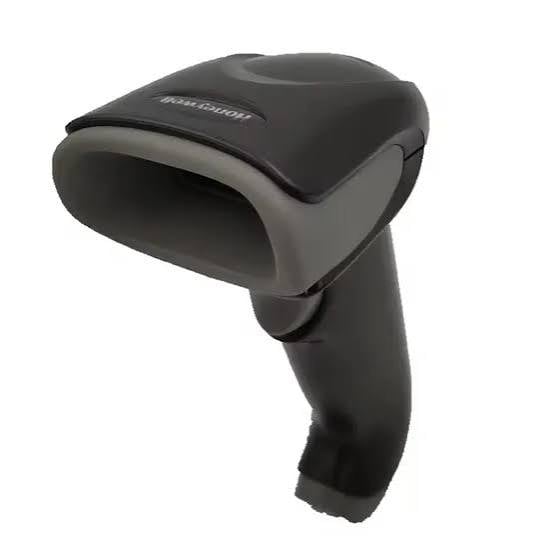
In today’s fast-paced business environment, accuracy and efficiency are essential for success. Businesses across retail, warehousing, healthcare, manufacturing and logistics rely on technology to manage products, track inventory and process transactions quickly. One of the most useful tools for these tasks is a barcode scanner.
A barcode scanner helps businesses read product information encoded in barcodes, reducing manual data entry and minimising human errors. From scanning items at checkout counters to tracking packages in warehouses, this technology plays an important role in modern operations.
Whether you run a small retail shop, an online store or a large distribution centre, choosing the right barcode scanning solution can help streamline daily activities, improve productivity and enhance customer service.
In this guide, we explore what a barcode scanner is, how it works, its different types, its benefits and how to choose the right device for your business.
What Is a Barcode Scanner?
A barcode scanner is an electronic device that reads information stored in a barcode and converts it into digital data. This information can then be transferred to a computer, point-of-sale (POS) system, inventory management platform or other compatible software.
Barcodes typically contain information represented by lines, spaces or patterns. Traditional one-dimensional (1D) barcodes use parallel lines of varying widths, while two-dimensional (2D) barcodes, such as QR codes, use patterns of squares or other shapes.
When a barcode scanner reads a code, the system interprets the information and makes it available to the connected application.
Barcode scanners are commonly used to identify products, update stock records, process sales, track shipments and manage assets.
How Does a Barcode Scanner Work?
A barcode scanner uses an optical sensor or imaging technology to capture the barcode’s pattern. Its decoding system translates the captured information into data that software can understand.
The process generally involves three steps:
- Scanning: The device captures the barcode using a laser or image sensor, depending on the scanner type.
- Decoding: The scanner interprets the barcode’s pattern and converts it into readable data.
- Data transfer: The information is sent to a connected computer, POS terminal, mobile device or inventory system.
For example, when a cashier scans a product at a checkout counter, the POS system can retrieve its price and description. In a warehouse, scanning a package can update its location or movement record.
The information stored directly in a barcode may be limited to an identifier. Additional details, such as a product’s price or description, are often retrieved from a connected database.
What Are the Different Types of Barcode Scanners?
Choosing the right barcode scanner depends on your business requirements, scanning environment and the types of barcodes you need to read.
1. Handheld Barcode Scanner
A handheld barcode scanner is one of the most widely used options. It is easy to operate and suitable for retail stores, warehouses, libraries and inventory management.
Users point the device at a barcode and press a trigger or activate its scanning function. Many models offer ergonomic designs for comfortable use throughout the working day.
2. Wireless Barcode Scanner
Wireless barcode scanners use technologies such as Bluetooth or proprietary radio connections to transmit scanned information without a direct cable connection.
They provide greater mobility, making them useful for stocktaking, warehouse operations and scanning large or bulky products. Buyers should check the wireless range, battery life and compatibility with their existing systems.
3. Fixed Barcode Scanner
Fixed barcode scanners are installed in a specific position, such as a checkout counter, production line or automated sorting system.
They are useful when products pass through a designated scanning point. Depending on the model, scanning can take place automatically without the user manually aiming a handheld device.
4. 2D Barcode Scanner
A 2D barcode scanner can read two-dimensional codes, including QR codes and Data Matrix codes, as well as many common 1D barcodes.
These scanners are useful in healthcare, manufacturing, ticketing and mobile payment environments where compact codes may contain more information than traditional barcodes.
5. Mobile Computer with Barcode Scanner
Mobile computers combine barcode scanning with computing capabilities, a display and an operating system. Many models also include Wi-Fi or cellular connectivity.
They are particularly useful for warehouse workers, delivery teams and field-service employees who need to scan items and access business applications while moving between locations.
What Are the Benefits of Using a Barcode Scanner?
Barcode scanning can offer several advantages for businesses of different sizes.
Improved Accuracy
Manual data entry can lead to typing mistakes, incorrect product numbers and inaccurate stock records. Barcode scanning reduces these errors by capturing information directly from the code.
Faster Transactions
Scanning products is generally faster than entering product identifiers manually. This can help retailers reduce checkout times and allow warehouse staff to process more items efficiently.
Better Inventory Management
Businesses can use barcode scanners to record incoming stock, track product movements, conduct stock counts and monitor outgoing orders. More accurate records can help reduce stock discrepancies and improve replenishment decisions.
Increased Employee Productivity
Automating routine data capture allows employees to spend less time on repetitive administrative tasks. Staff can focus on customer service, order fulfilment and other important activities.
Improved Traceability
In logistics, manufacturing and healthcare, barcode scanning can support the tracking of products, packages, components and assets. When integrated with suitable software, scan records can help businesses understand where an item has been and when it was processed.
Which Businesses Need a Barcode Scanner?
Barcode scanners are useful across a wide range of industries.
- Retail: Scan products, process sales and support inventory control.
- Warehousing: Record stock movements, pick orders and verify shipments.
- E-commerce: Match products with customer orders and reduce fulfilment errors.
- Healthcare: Identify supplies, track equipment and support patient or specimen identification workflows where appropriate.
- Manufacturing: Track components, work-in-progress items and finished products.
- Logistics: Scan parcels and record shipment handling events.
- Libraries: Manage book loans, returns and collections.
- Education and offices: Track equipment, documents and organisational assets.
The best solution depends on the volume of scanning, working conditions and the software used by the organisation.
How Do You Choose the Right Barcode Scanner?
Before purchasing a barcode scanner, consider the following factors.
Barcode Compatibility
Determine whether you need to scan 1D barcodes, 2D codes or both. A 2D imager is generally the more flexible option when QR codes and Data Matrix codes are part of your workflow.
Connectivity
Choose between USB, Bluetooth, Wi-Fi or other supported connections based on how the device will be used. Confirm that the scanner works with your computers, mobile devices and business software.
Scanning Environment
Consider lighting conditions, scanning distance, product size and whether items are stationary or moving. Warehouses and industrial environments may require devices designed for demanding conditions.
Durability and Battery Life
For intensive daily use, look for a model with suitable drop resistance, ergonomic handling and reliable battery performance. Wireless devices should provide enough operating time for the intended shift.
Software Integration
Check whether the scanner supports your POS system, inventory software, warehouse management platform or other applications. Compatibility can be just as important as the hardware itself.
Budget and Long-Term Value
Compare the purchase price with durability, support, warranty coverage and expected usage. An affordable scanner may be suitable for occasional tasks, while high-volume operations may benefit from a more robust device.
A barcode scanner is a valuable tool for businesses seeking to improve accuracy, speed and inventory control. By automating data capture, it can simplify everyday tasks, reduce manual errors and support more efficient workflows.
From handheld devices used in retail stores to advanced scanning systems used in warehouses and manufacturing facilities, there are solutions for a wide variety of business needs.
Before investing in a barcode scanner, assess your scanning requirements, connectivity options, working environment and software compatibility. Selecting the right device can help your business improve productivity and maintain more reliable operational records.
Frequently Asked Questions (FAQs)
1. What is a barcode scanner used for?
A barcode scanner reads barcode information and transfers it to compatible software. Common uses include product identification, retail checkout, inventory management, shipment tracking and asset monitoring.
2. How does a barcode scanner work?
It captures a barcode using an optical sensor or image sensor, decodes its pattern and sends the resulting data to a connected device or application.
3. What is the difference between a 1D and a 2D barcode scanner?
A 1D scanner reads traditional linear barcodes. A 2D scanner reads codes such as QR codes and Data Matrix codes and often supports common 1D barcodes as well.
4. Can a barcode scanner work wirelessly?
Yes. Wireless models commonly use Bluetooth or other radio connections to transmit data. Some scanners can also store scans temporarily when they are outside their connection range.
5. Can I connect a barcode scanner to my computer?
Yes. Many scanners connect through USB, while wireless models may connect through Bluetooth or a compatible receiver. Check the device’s compatibility with your operating system and software.
6. Is a barcode scanner suitable for small businesses?
Yes. Small retailers, offices, online sellers and local warehouses can use barcode scanners to simplify stock management, record transactions and reduce manual entry.
7. Can barcode scanners read QR codes?
Only scanners that support QR code reading can reliably scan them. Most modern 2D imaging scanners support QR codes, but traditional laser scanners generally do not.
8. Do barcode scanners require special software?
The scanner itself may work as a keyboard input device for basic tasks, but inventory management, product lookups and advanced reporting usually require compatible software.
9. How much does a barcode scanner cost?
Prices vary depending on scanning technology, connectivity, durability, performance and brand. Basic wired models are generally more affordable than advanced industrial scanners or mobile computers.
10. How do I choose the best barcode scanner for my business?
Identify the barcode types you need to read, the number of daily scans, your connectivity requirements, operating environment and software compatibility. Compare suitable models based on reliability, ease of use and long-term value