







Key Takeaways
- Improve efficiency: AI automation pays back fastest on repetitive, high-volume work such as invoices, tickets, scheduling and inspections.
- Enhance user experience: Faster replies, fewer errors and round-the-clock service in Arabic and English raise customer and employee satisfaction while cutting handling costs.
- Stay competitive: The UAE already has some of the highest AI adoption rates in the world, so a slower competitor carries a heavier cost base.
- Start with data, not tools: Rank processes by volume, error rate and labour hours before you pick any technology.
- Pilot small, scale proven wins: McKinsey’s 2025 survey found most firms use AI, yet only about a third are scaling it across the enterprise.
- Count the running cost of AI itself: Licences, usage fees, integration and monitoring belong in the ROI maths from day one.
- Choose partners who integrate: Savings disappear when a new tool can’t talk to your ERP, CRM or legacy systems.
Most operating budgets don’t leak through one big hole. They leak through ten thousand small ones: an invoice retyped twice, a technician dispatched to a machine that failed last week, a support agent answering the same delivery question for the fortieth time before lunch.
AI automation goes after exactly those leaks. Because each one repeats thousands of times a month, closing them adds up faster than most finance teams expect.
This guide shows where operating costs actually hide, seven use cases that reduce them, how to measure the return without fooling yourself, and a six-step rollout plan built for businesses in the UAE. Where the evidence is thin, we’ll say so.
What Is AI Automation, and How Does It Reduce Operating Costs?
AI automation uses machine learning, language models and computer vision to perform tasks that normally need human judgement, such as reading documents, answering queries or spotting defects. It lowers operating costs by cutting manual labour hours, reducing errors and rework, preventing equipment failures, and shortening processes that tie up cash.
That’s different from the rule-based scripting many companies already use. Traditional robotic process automation (RPA) follows fixed instructions. It works until a supplier changes an invoice layout, then it breaks and someone fixes it by hand.
AI handles the variation. It reads a messy PDF, classifies an angry email, or flags a vibration pattern no rule anticipated. In practice the best business process automation pairs the two: RPA for the predictable steps, AI for the untidy inputs around them.
Savings arrive through four channels:
- Labour: fewer hours spent on keying, checking, chasing and reporting
- Errors: less rework, fewer penalties, fewer duplicate payments
- Downtime: failures caught before they stop a line or a fleet
- Waste: lower scrap, overstock, energy use and expediting fees
The Hidden Cost of Doing Nothing
Manual processes have a nasty property: their cost grows in a straight line with volume. Win 20% more customers and you need roughly 20% more people to key, check and answer. Margins stay flat while revenue climbs.
AI automation bends that line. Once a model reads invoices or resolves routine queries, handling the next thousand costs a small fraction of the last thousand. That’s why operational cost reduction through AI looks modest in month one and decisive in year two.
Audit First: Where Your Operating Costs Actually Hide
You can’t cut what you haven’t measured. Before anyone demos a tool, pull twelve months of data and map it against the table below.
| Cost area | Typical leak | AI automation lever |
|---|---|---|
| Finance and procurement | Manual data entry, invoice matching, reconciliation | Intelligent document processing |
| Customer service | Repetitive tickets, long handle times | AI agents and ticket triage |
| Maintenance | Unplanned downtime, over-servicing | Predictive maintenance |
| Quality and safety | Manual inspection, scrap, incidents | Computer vision |
| Supply chain | Overstock, stockouts, rush shipping | Demand forecasting |
| Facilities | Energy waste | AI-driven energy optimisation |
| HR and back office | Onboarding, scheduling, report building | Workflow automation |
For each process, record four numbers: monthly volume, minutes per item, error rate and fully loaded cost per hour. Multiply, and you’ll see which processes deserve attention first.
There’s a useful signal from the research. In McKinsey’s 2026 survey, respondents most often reported AI-driven cost reductions in supply chain management, service operations and manufacturing. If your business has any of those, start there.
7 Practical Ways to Cut Costs With AI Automation
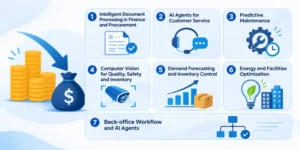
1. Intelligent document processing in finance and procurement
Accounts payable is the classic first project. Published benchmarks vary widely depending on what a company counts, but APQC-based figures commonly put manual invoice handling somewhere around $10 to $15 or more per invoice once exceptions are included, against roughly $2 to $5 when extraction and matching are automated.
Here’s an illustrative example, not a client result. A distributor processes 5,000 invoices a month at $12 each. Bring that to $4 and the saving is $40,000 a month, or $480,000 a year, before counting faster early-payment discounts.
For UAE firms, check three things before buying: bilingual Arabic and English extraction, VAT field accuracy, and integration with your accounting system. A tool that reads only clean English PDFs will disappoint you within a week.
How to start: take your top ten suppliers by invoice volume. They usually cover most of the workload, and their formats are consistent enough for a quick win.
2. AI agents for customer service
Pick the twenty most repetitive questions: order status, appointment changes, policy queries, payment confirmations. Train an AI agent to resolve those end to end, and route everything else to a human with a written summary so the customer never repeats themselves.
The savings come from shorter handle times and no extra night shift. The experience improves too, since customers get an answer in seconds, not hours.
One warning. Measure resolution rate, not deflection. A bot that merely blocks tickets pushes customers into repeat contacts, which raises cost instead of lowering it.
How to start: export three months of tickets, cluster them by topic, and automate only the clusters where the correct answer is always the same.
3. Predictive maintenance
Unplanned downtime is expensive everywhere. A Siemens and Senseye study estimated it costs Fortune Global 500 companies about $1.4 trillion a year, roughly 11% of revenue.
McKinsey research is widely cited for showing predictive maintenance can cut unplanned downtime by 30% to 50% and lower maintenance costs in the high teens to mid-twenties percent. Read that carefully, though. Those figures describe mature programmes. A first pilot with a noisy model rarely hits them, and false alarms can erase savings quickly.
The practical route: choose three to five critical assets that already have sensors, collect clean history, and tune the model until technicians trust its alerts. Trust is the real deliverable.
How to start: rank assets by the cost of one hour of failure, then instrument only the top few.
4. Computer vision for quality, safety and inventory
Cameras plus trained models can inspect products on a line, confirm helmets and vests are worn on site, count pallets, or read container codes at a gate. Each task replaces manual checking that is slow, tiring and inconsistent.
Logistics, construction, manufacturing and retail businesses often work with specialists in computer vision services Dubai to design camera placement, label training data and tune models for local conditions like glare, dust and night operations.
Start on a single line or a single gate. Lighting and camera angle cause more failures than the algorithm does.
How to start: film one week of the process you want to automate. If a human reviewer can’t judge it reliably from the footage, a model won’t either.
5. Demand forecasting and inventory control
Machine learning forecasts can combine sales history, promotions, weather, tourism patterns and calendar effects such as Ramadan, Eid and the winter events season. Better forecasts mean less capital locked in slow stock and fewer emergency air shipments.
The effect shows up in three places: carrying cost, write-offs and expediting fees. Track each separately so you can see which one is actually moving.
How to start: forecast your fifty fastest-moving products first. Accuracy there matters most, and the data is richest.
6. Energy and facilities optimisation
Cooling is typically one of the largest energy loads in Gulf buildings, which makes it an obvious target. AI systems adjust setpoints using occupancy, weather forecasts and equipment behaviour, instead of fixed schedules.
Savings depend heavily on the building, so run a pilot on one site with a properly metered baseline. Without that baseline you’ll argue about the results for months.
7. Back-office workflow and AI agents
Onboarding paperwork, leave requests, vendor registrations, month-end reconciliations, recurring management reports. None of it is glamorous, and all of it eats hours.
McKinsey’s 2025 survey found 62% of respondents were at least experimenting with AI agents, mostly in IT and knowledge management. Treat these as supervised assistants for now: let them draft, match and chase, with a person approving anything that moves money or changes a record.
How AI Automation Improves Experience, Not Just the Budget
Cost savings get the headlines, but the experience gains are what keep a programme alive after the first quarter.
Customers get faster answers, accurate invoices, and delivery updates without having to ask. Nobody enjoys repeating their order number to a third agent.
Employees spend less time on copy-and-paste work and more on exceptions, relationships and judgement calls. That tends to improve retention, which quietly lowers hiring and training costs.
Managers get live visibility. When processing times, error rates and queue lengths sit on one dashboard, problems surface in hours, not at month-end.
This matters because the strongest case for AI automation is rarely “we’ll cut people.” It’s “we’ll give customers speed and staff better work, and the cost base will fall as a result.”
AI Automation Use Cases Across UAE Industries
The same cost logic applies everywhere, but the entry point differs by sector.
- Logistics and freight: extract data from bills of lading and customs documents, predict arrival times, and use gate cameras to log containers automatically.
- Real estate and property management: triage tenant requests, summarise lease clauses, and route maintenance tickets to the right contractor.
- Retail and hospitality: forecast demand around peak seasons, answer guest queries in several languages, and tune air conditioning to occupancy.
- Construction: monitor site safety with cameras and compare progress photos against plans.
- Healthcare and insurance: process claims documents and flag mismatches before they become disputes.
Why UAE Businesses Can’t Afford to Wait
The UAE isn’t a cautious market for this technology. The Microsoft AI Economy Institute’s diffusion report, as cited by Khaleej Times, ranks the country first globally for AI adoption, with over 70% of the working-age population regularly using AI tools.
At national level, the government says the digital economy contributes close to 12% of GDP and aims to lift that above 20% by 2031. Separate analyst forecasts put AI’s contribution at about $96 billion by 2031, around 13.6% of GDP.
What does that mean for your cost base? Customers and employees now expect instant, accurate, bilingual service. Competitors are automating the back office. If you wait, you pay more per transaction than rivals who’ve already moved, and that gap compounds every quarter.
Adopting AI automation for UAE businesses also comes with obligations. The UAE’s Personal Data Protection Law, along with free zone regimes such as DIFC and ADGM, shapes where data can live and how it can be processed. Settle data residency and consent questions before the pilot, not after the audit.
A Six-Step Roadmap to Implement AI Automation
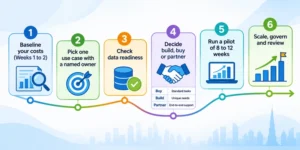
Step 1: Baseline your costs (weeks 1 to 2)
Use the audit above. Without a baseline you can’t prove savings, and finance won’t fund a second project.
Step 2: Pick one use case with a named owner
Choose a process with high volume, clear rules for what “correct” means, and a manager who cares about the number. Define one headline metric: cost per invoice, minutes per ticket, downtime hours per month.
Step 3: Check data readiness
Most stalled projects fail here. Is the data complete, consistent and accessible? Predictive maintenance needs sensor history. Document processing needs a few hundred real samples. Forecasting needs clean sales records. Budget time to fix gaps.
Step 4: Decide build, buy or partner
Off-the-shelf tools suit standard problems like invoice capture. Custom builds suit processes that are unique to you. An experienced AI development company Dubai can build models around proprietary data, while system integrators in Dubai handle the connections to ERP, CRM and legacy platforms, which is where many projects quietly stall.
If you’d rather have one accountable team from audit to rollout, AI Automation Services In Dubai typically bundle discovery, development, integration and support.
| Route | Best for | Watch out for |
|---|---|---|
| Buy a packaged tool | Standard tasks such as invoice capture or chat support | Limited customisation, per-seat or per-document fees |
| Build custom | Unique processes and proprietary data | Longer timeline, need for in-house maintenance |
| Partner end to end | Teams without AI or integration capacity | Vendor dependence, so insist on documented handover |
Step 5: Run a pilot of 8 to 12 weeks
Keep a human in the loop. Compare results against the baseline weekly. Log every error the system makes, because that log is your training roadmap.
Step 6: Scale, govern and review
Expand to adjacent processes only after the pilot hits its target. Assign an owner for model monitoring, since accuracy drifts as invoices, products and customer behaviour change.
How to Measure the ROI of AI Automation
Keep the formula plain:
ROI = (annual savings + avoided costs − annual running cost) ÷ total investment
Savings include labour hours redeployed, errors avoided, downtime prevented and waste cut. Running costs are where optimistic business cases fall apart: licences, usage and token fees, cloud, monitoring, retraining and support.
That isn’t a small point. McKinsey’s 2026 survey found about one in five organisations said AI-related operating costs, including token costs, had constrained their AI use. Model the running cost of AI automation as carefully as you model the savings.
Track these metrics monthly:
- Cost per transaction
- Average handling time
- Error and rework rate
- Unplanned downtime hours
- Staff hours redeployed to higher-value work
- Customer satisfaction or resolution rate
Be honest about the enterprise-level picture, too. McKinsey’s 2025 research found only 39% of respondents reported any EBIT impact from AI, with most of it below 5%. Savings at the use-case level are common. Company-wide profit impact takes sustained effort across several processes.

Common Mistakes That Erode Savings
- Automating a broken process. You’ll just produce errors faster. Fix the workflow first.
- Aiming only at headcount. McKinsey found the firms getting the most value often pursue growth and innovation alongside efficiency, not cost cutting alone.
- Ignoring data quality. A model is only as good as what it learns from.
- Removing the human fallback. Exceptions always exist. Plan for them.
- Skipping change management. Staff who fear replacement will work around the system. Show them what they’ll do instead.
- Over-scoping the pilot. Three processes at once means none gets done properly.
Final Thoughts
Reducing operating costs with AI automation isn’t about buying the newest tool. It’s about picking the right process, measuring honestly, and scaling only what works.
Start with one workflow where the numbers are clear. Prove the saving. Then repeat it elsewhere. Businesses that work this way build a lower cost base that competitors can’t copy overnight.
Ready to find where your biggest savings sit? Book a free cost-automation assessment and get a prioritised list of use cases, expected savings and a realistic timeline.
Frequently Asked Questions
How much can AI automation reduce operating costs?
It depends on the process and the maturity of the programme. Automated invoice handling can cost a fraction of manual handling, and mature predictive maintenance programmes report 30% to 50% less unplanned downtime. Plan on pilots delivering less than headline figures and mature deployments approaching them.
Which processes should I automate first?
Start with high-volume, rule-heavy, measurable work: invoice processing, tier-one customer queries, scheduling and routine reporting. These have clear baselines, so savings are easy to prove.
How long until AI automation pays for itself?
Simple document and workflow projects often pay back within months, while predictive maintenance and computer vision usually need longer because of sensors, data collection and tuning. Your own baseline and running costs decide the answer, not a vendor’s brochure.
Is AI automation only for large enterprises?
No. Mid-sized firms often gain most from document processing and customer service automation because the tools are packaged and need little custom development. Larger organisations tend to dominate agentic and custom deployments, according to McKinsey’s 2026 findings.