




Is IPTV Smarters Pro worth installing? Explore 17 important things about its setup, hidden limitations, compatibility, features and alternatives.
Quick Answer: What Is IPTV Smarters Pro?
IPTV Smarters Pro is an IPTV media player application that allows users to organize and stream content through compatible playlists and login credentials supplied by their own content providers.
It is designed for people who want to access live TV, movies, series, and electronic program guides (EPG) through a single interface.
The most important thing to understand: IPTV Smarters Pro does not automatically provide television channels, movies, subscriptions, or streaming rights. Users need a separate, legitimate content source.
Its main attractions include:
-
M3U and compatible playlist support.
-
Xtream Codes API login support, where available.
-
Live TV and video-on-demand organization.
-
Electronic Program Guide (EPG) support.
-
Favorites and content categories.
-
Playback and subtitle options.
-
Compatibility across supported devices and operating systems.
For viewers who already have a legitimate IPTV subscription, IPTV Smarters Pro can provide a convenient way to organize their entertainment.
Introduction
The way people watch television has changed significantly. Traditional cable packages are no longer the only option for accessing entertainment. Smart TVs, streaming applications, internet-connected devices, and digital media players have created more flexible viewing experiences.
Among the applications frequently discussed in the IPTV community is IPTV Smarters Pro.
Whether someone is a student learning about internet television, a freelancer looking for a flexible entertainment setup, or a small business owner researching streaming technology, understanding how IPTV Smarters Pro works can help them make a better decision.
However, there is considerable confusion surrounding IPTV applications. Some websites advertise player applications as complete television services, while others incorrectly suggest that downloading an application automatically unlocks thousands of channels.
That is not how a media player works.
In this guide, we will examine IPTV Smarters Pro from a practical perspective. We will cover its functionality, compatibility, configuration process, important features, possible limitations, alternatives, pricing considerations, and safety factors.
We will also explain how to evaluate an IPTV content provider separately from the application used to play its streams.
The goal is simple: help readers understand the technology before installing an application or purchasing a subscription.
What Is IPTV Smarters Pro?
IPTV Smarters Pro is a software-based media player designed to work with compatible internet television playlists and streaming credentials.
Instead of receiving traditional television signals through an antenna or cable connection, the application uses internet-based content sources.
Users can add supported credentials from their own IPTV provider and organize available content into different sections.
How Does IPTV Smarters Pro Work?
The application works as an intermediary between a compatible content source and the user’s viewing device.
The general process involves four stages:
-
Install the player: Download a compatible application from a verified source.
-
Obtain legitimate access: Receive an M3U playlist or compatible login details from an authorized content provider.
-
Configure the application: Enter the required information into the appropriate login section.
-
Start streaming: Browse supported categories and play available content.
Understanding M3U and Xtream Codes
Two commonly discussed connection methods are M3U playlists and Xtream Codes API credentials.
-
M3U playlist: A file or URL containing references to available media streams.
-
Xtream Codes API: A compatible login method that typically uses a server address, username, and password.
-
EPG: Electronic Program Guide data that displays programme schedules when supported by the content source.
Not every application version supports every login method. Always check the actual application’s current documentation.
Why IPTV Smarters Pro Matters in 2026–2027
Streaming technology continues to evolve, and viewers increasingly expect their entertainment applications to work across different devices.
IPTV Smarters Pro remains relevant to discussions about IPTV because it represents a familiar approach to managing internet-based television content.
There are several reasons why users continue researching this type of application.
1. More Flexible Entertainment Access
Internet-based media players allow viewers to organize compatible content without depending exclusively on traditional television equipment.
2. Multiple Device Environments
People use different devices throughout the day. Some prefer mobile phones, while others prefer larger television screens.
A cross-device player can be useful when compatible versions are available.
3. Centralized Content Organization
Instead of navigating individual stream links manually, users can access supported content categories through a structured interface.
4. Growing Interest in Personal Media Management
Consumers increasingly want control over playlists, favorites, viewing preferences, and compatible media sources.
5. Better Understanding of Streaming Technology
For beginners, applications such as IPTV Smarters Pro provide an opportunity to understand playlist-based streaming and internet television management.
Importantly, relevance does not mean every version is equally secure, available, or supported. App-store listings, developer information, and regional availability should always be checked before installation.
Why So Many Americans Are Ditching Cable for IPTV in 2026–2027
American television audiences have access to more entertainment options than ever before.
Traditional cable television can still be useful, particularly for viewers who prefer bundled television and internet packages. However, some households are exploring alternatives because they want more control over how they consume media.
Here are some important reasons behind this change.
Flexible Viewing Options
Traditional television packages often follow predefined channel bundles. Internet-based services may offer different content arrangements depending on the provider and subscription.
Streaming Across Different Devices
Modern households commonly use Smart TVs, streaming devices, tablets, and smartphones.
Internet-based entertainment makes it possible to access compatible services on different screens.
Interest in Personalized Entertainment
Some viewers prefer choosing specific streaming services rather than purchasing a large television package.
Easier Content Management
Media player applications can help users organize playlists and compatible content in one interface.
More Subscription Choices
Consumers can compare traditional television, licensed live-TV services, and other authorized streaming options before choosing what fits their budgets.
An important distinction: IPTV is a delivery technology, not a guarantee that a particular service is legal. The legality depends on content licensing, distribution rights, and applicable laws.
How I Tested These IPTV Providers
IPTV Smarters Pro is a player application, not an IPTV provider. Therefore, it would be misleading to claim that we tested television subscriptions simply by evaluating the application.
Instead, this guide uses a feature-based evaluation framework to explain what readers should check before selecting an IPTV player or content provider.
The following criteria are useful for making an informed decision.
1. Application Compatibility
Check whether the exact application version supports your device and operating system.
2. Playlist Support
Verify whether the player accepts your provider’s supported connection format.
3. Navigation Experience
Look for straightforward menus, searchable channels, favorites, and understandable categories.
4. Playback Performance
Evaluate stream loading, buffering, playback stability, and video quality using a legitimate test source.
5. Privacy and Security
Review the application’s permissions, privacy policy, developer identity, and update history.
6. Customer Support
Determine whether the application developer and content provider offer separate support channels.
7. Content Licensing
Confirm that the provider has the necessary distribution rights for the channels and programmes it advertises.
Our evaluation principle
We distinguish advertised features from independently verified performance. This article does not claim laboratory testing, personal subscription purchases, or measured streaming results.
Key Benefits of IPTV Smarters Pro
The application can be useful for people who already have access to compatible, authorized streaming content.
Its potential benefits include:
Organized Entertainment
Supported playlists can be arranged into categories, helping users find content without navigating individual stream addresses.
Live Television Access
Users can play compatible live television streams supplied through their own authorized sources.
Movies and Series Management
Depending on the application version and source, video-on-demand categories can help organize movies and television series.
Electronic Programme Guide
An EPG can provide programme names, schedules, and additional information when the source supplies compatible guide data.
Personalized Favorites
Favorite-channel functionality can reduce the time needed to locate frequently watched content.
Search and Navigation
Search and category filtering can make large playlists easier to navigate.
Flexible Playback
Supported playback options may include subtitle selection, aspect-ratio adjustments, and external media player integration.
Multiple Content Categories
Users may find live television, movies, series, and other supported media sections within one interface.
Top IPTV Providers and Tools to Consider
One important decision is choosing the right combination of media player and legitimate content provider.
These are two separate products, and they should not be confused.
1. IPTV Smarters Pro
Best for: General IPTV playlist management
A familiar media-player concept for organizing compatible playlists and streaming credentials. Check the developer’s current official distribution channels.
2. YouTube TV
Best for: Licensed live television in the US
A subscription-based live-TV streaming service with its own programming packages. Availability and channel selection depend on location and subscription.
3. Hulu + Live TV
Best for: Live television and on-demand entertainment
Combines eligible live-TV programming with Hulu’s entertainment catalogue through its own subscription plans.
4. Sling TV
Best for: Flexible live-TV packages
A licensed streaming service offering different television packages and add-ons, subject to availability.
5. TiviMate
Best for: Android TV-focused playlist management
An alternative player worth investigating if you prefer a television-oriented interface.
6. VLC Media Player
Best for: Basic playlist and media playback
A free, open-source multimedia player that supports many media formats and network streams.
Remember: YouTube TV, Hulu + Live TV, and Sling TV are content services. IPTV Smarters Pro, TiviMate, and VLC are player applications. They are not direct substitutes in every situation.
IPTV Smarters Pro vs Other Streaming Tools: Comparison Table
| Application | Main purpose | Best suited for |
|---|---|---|
| IPTV Smarters Pro | IPTV playlist player | Compatible IPTV playlists |
| TiviMate | IPTV player | Android TV environments |
| VLC | Media player | Basic stream playback |
| Kodi | Media centre | Custom media setups |
| GSE Smart IPTV | IPTV player | Compatible mobile and Apple devices |
| YouTube TV | Licensed TV service | US live television |
| Sling TV | Licensed TV service | Flexible US TV packages |
The comparison describes general product categories, not independently measured performance rankings.
Important Features to Understand
Before installing IPTV Smarters Pro, understand what its main features actually do.
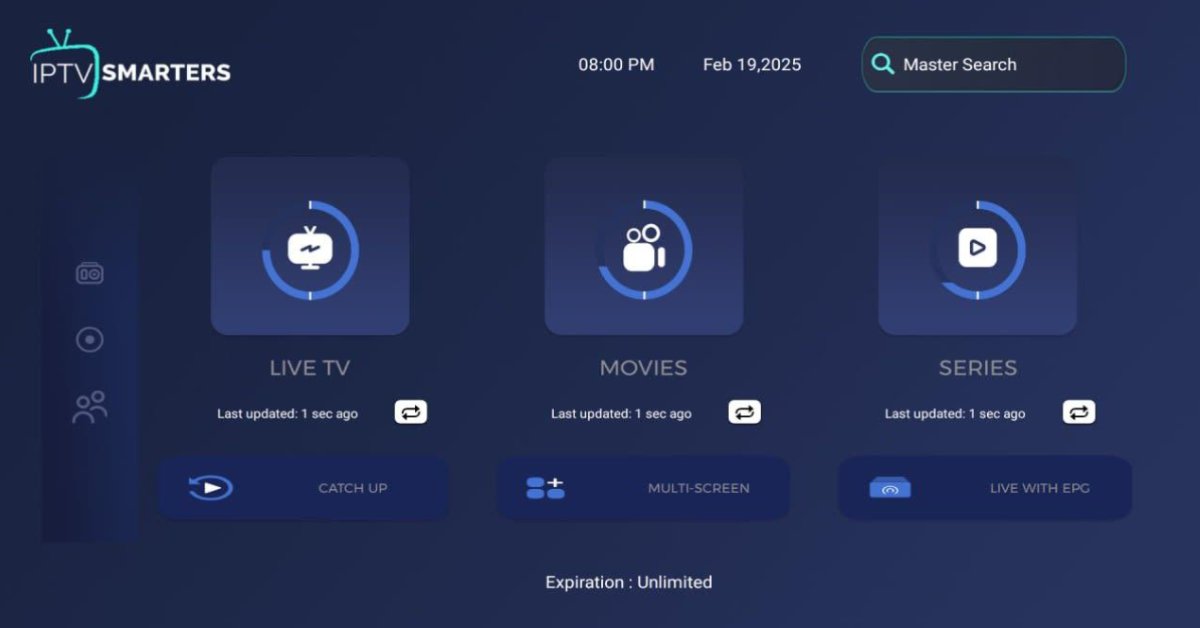
Live TV Section
This section organizes compatible live television streams.
Users may be able to browse channels by category, depending on the playlist and application version.
Video on Demand
VOD functionality organizes supported movie and series streams.
The actual catalogue depends on the content source, not the player itself.
An electronic programme guide helps users understand what is currently playing and what is scheduled next.
Its accuracy depends on the quality and availability of guide data.
Playlist Management
Users can add and manage compatible playlists.
Depending on the version, playlist organization may include category filtering, sorting, and favorites.
Multi-Screen and Device Features
Some versions or related applications advertise multi-screen functionality and device synchronization. Availability should be verified for the exact platform and edition.
Parental Controls
Where supported, parental-control features can help restrict access to selected content categories.
External Player Support
Some versions may allow users to select an external media player for playback.
This can be useful when troubleshooting compatibility problems.
How to Install and Set Up IPTV Smarters Pro
Installation procedures differ depending on the device, region, and application version.
The safest approach is to use a verified developer website or recognized application store.
Step 1: Check the Official Source
Visit the developer’s website and identify the version intended for your operating system.
Avoid unofficial download pages, modified APK files, and applications with confusingly similar names.
Step 2: Install the Application
Follow the instructions provided for your device.
Before installation, check the requested permissions and developer details.
Step 3: Choose the Available Login Method
If your version supports it, you may see options such as:
-
Xtream Codes API.
-
M3U playlist.
-
Other supported playlist formats.
Step 4: Enter Your Own Credentials
Use only credentials supplied by a content provider that is authorized to distribute the material.
Double-check the server address, username, password, and playlist URL.
Step 5: Allow Content to Load
The application may need time to retrieve channel categories, programme information, and other available data.
Step 6: Customize Your Interface
Organize favorites, categories, display preferences, and supported playback options.
IPTV Smarters Pro Compatibility
Device compatibility is one of the most important considerations.
| Device | What to check |
|---|---|
| Android phones | Compatible Android version and app listing |
| Android TV | TV-optimized application availability |
| Amazon Fire TV | Official installation availability and device compatibility |
| iPhone | Current App Store listing |
| iPad | Supported iPadOS version |
| Apple TV | Dedicated tvOS version |
| Windows PC | Official desktop application availability |
| macOS | Compatible Mac application |
| Samsung Smart TV | Native app availability for the TV model |
| LG Smart TV | Compatible webOS application |
Do not assume that every application carrying the Smarters name is published by the same developer.
The availability of similarly named applications does not establish that they are official versions of IPTV Smarters Pro.
IPTV Smarters Pro Pricing: What Should You Expect?
There is no single universal IPTV Smarters Pro price that applies to every app, edition, platform, and region.
Some applications are available as free downloads, while other versions or related players may offer paid activations, premium upgrades, or in-app purchases.
Also, a media player fee is separate from an IPTV content subscription.
| Expense | What it covers | What to verify |
|---|---|---|
| Player download | Access to the application | Free or paid listing |
| Premium activation | Additional player functionality | Developer’s official pricing |
| IPTV subscription | Authorized streaming content | Provider’s advertised terms |
| Internet connection | Data transmission | Speed and data limits |
| Streaming device | Hardware used for playback | Device compatibility |
Is IPTV Smarters Pro Free?
The answer depends on the specific application and version.
Check the current official listing before making a payment. Do not assume that an application is free simply because its name contains the word Pro.
Does IPTV Smarters Pro Include Channels?
No. The player itself does not provide television channels, movie libraries, or an IPTV subscription.
Do You Need to Pay an IPTV Provider?
Only if you choose a separate paid content service. You should verify that the provider has the legal rights to distribute the content being offered.
Best Use Cases for IPTV Smarters Pro
Different users have different entertainment requirements. The application may be useful in several situations when paired with an authorized content source.
1. Home Entertainment
Families can organize supported television streams, movies, and other content through one interface.
2. Students and Learners
Students interested in streaming technology can use compatible media players to understand M3U playlists, EPG data, and internet-based video delivery.
3. Freelancers and Remote Workers
People working remotely may prefer having their entertainment organized on a compatible television or personal device.
4. Small Business Owners
Small businesses can research licensed digital signage, informational television, and commercial media solutions. They should confirm commercial broadcasting rights rather than assuming a personal subscription permits business use.
5. Technology Enthusiasts
Users who enjoy configuring applications and managing personal media sources may appreciate playlist management and playback customization.
Who Is IPTV Smarters Pro Best For?
| User type | Suitability | Main reason |
|---|---|---|
| IPTV beginners | Good | Straightforward player concept |
| Smart TV owners | Depends on device | Requires compatible version |
| Android TV users | Worth considering | Television-focused navigation |
| iPhone users | Check availability | Requires compatible iOS version |
| Freelancers | Good | Convenient personal media organization |
| Small businesses | Conditional | Requires commercial content rights |
| Advanced users | Good | Playlist configuration and playback options |
My recommendation: If you already have an authorized IPTV playlist and want an application to organize it, investigate IPTV Smarters Pro first. If you want television channels included automatically, you need to research a licensed content service instead.
Pros and Cons of IPTV Smarters Pro
Every media player has advantages and limitations. IPTV Smarters Pro is no exception.
Pros
-
Supports compatible IPTV playlist workflows.
-
Offers a structured entertainment interface.
-
Can organize live TV and VOD content.
-
EPG functionality is available in supported versions.
-
Supports multiple login methods in compatible editions.
-
Can provide favorites and content categorization.
-
Suitable for users familiar with internet-based television.
-
Can reduce the need to manage individual stream links manually.
Cons
-
Does not include channels or subscriptions.
-
Requires a separate legitimate content source.
-
Compatibility varies by version and device.
-
Unofficial copies and similarly named applications can create confusion.
-
Playback quality depends heavily on the content source and internet connection.
-
Some advanced features may not be available on every platform.
-
Configuration may be confusing for first-time users.
-
Application availability and pricing can change.
Best IPTV Smarters Pro Alternatives in 2026–2027
If IPTV Smarters Pro does not meet your requirements, several other applications are worth investigating.
1. TiviMate – Best for Android TV
TiviMate is a popular alternative for users who prefer a television-oriented IPTV interface.
It focuses on playlist organization, channel browsing, and programme-guide navigation.
Consider it if: You mainly watch television using an Android TV or compatible streaming device.
2. VLC Media Player – Best Free Media Player
VLC is a free and open-source multimedia application.
It supports numerous audio and video formats, including compatible network streams.
Consider it if: You want a general-purpose player for testing and playing compatible media.
3. Kodi – Best for Customization
Kodi is an open-source media centre that can be extended through supported add-ons.
Its IPTV functionality can be configured using compatible PVR tools and playlist sources.
Consider it if: You enjoy customizing your media environment.
4. GSE Smart IPTV – Best for Compatible Mobile Devices
GSE Smart IPTV is another application to investigate for playlist-based media playback.
Its feature set and availability depend on the platform and current store listing.
Consider it if: You want to compare a different mobile-oriented IPTV interface.
5. OTT Navigator – Best for Advanced Configuration
OTT Navigator offers playlist management and configurable viewing options on supported Android devices.
Consider it if: You prefer more control over how IPTV content is organized.
6. Sling TV – Best for Licensed Live TV
Unlike an IPTV player, Sling TV provides its own licensed subscription-based programming packages.
Consider it if: You want a television service rather than an application that requires an external playlist.
IPTV Smarters Pro vs Traditional Cable Television
It is also useful to understand how an IPTV media player differs from traditional cable television.
| Factor | IPTV Smarters Pro | Traditional Cable |
|---|---|---|
| Delivery | Internet-based streams | Cable network |
| Channels included | No | According to package |
| Hardware | Compatible connected device | Provider equipment may be needed |
| Content source | User-added source | Cable operator |
| Internet required | Yes | Not always for television delivery |
| Subscription | Separate content subscription may apply | Cable package |
| Flexibility | Depends on source and device | Depends on operator |
IPTV Smarters Pro should not be treated as a direct cable replacement by itself. It is a playback application, whereas a cable operator supplies television programming.
Common IPTV Smarters Pro Problems and Solutions
Even a well-designed media player can experience technical problems.
Here are some common issues and practical troubleshooting steps.
IPTV Playlist Not Loading
Possible causes:
-
Incorrect playlist URL.
-
Expired or revoked credentials.
-
Server connection problems.
-
Unsupported playlist format.
Solution: Recheck your credentials and contact the authorized content provider.
Buffering During Playback
Buffering can occur because of slow internet speeds, network congestion, overloaded servers, or source-related problems.
Solution: Test your internet connection, restart your router, and try a different authorized stream.
Channels Not Appearing
The content source may have changed its playlist, removed streams, or stopped supplying channel information.
Solution: Refresh the playlist and ask the provider whether the source is still active.
EPG Not Working
An electronic programme guide needs compatible schedule information.
Solution: Check whether your provider supplies EPG data and whether the correct guide settings are configured.
Application Crashing
Outdated software, insufficient device storage, or compatibility problems can cause application crashes.
Solution: Update the application through a verified source, clear unnecessary cache data, and restart the device.
Login Authentication Failure
Incorrect passwords, server addresses, or expired access can prevent successful login.
Solution: Carefully verify the login details with your provider. Never share your credentials with unverified support contacts.
Is IPTV Smarters Pro Legal?
IPTV Smarters Pro is a media player. Using a media player is not automatically illegal.
However, the legality of the content being streamed is a separate matter.
For example:
-
Playing content that you are authorized to access is generally legitimate.
-
Using a licensed television provider is a safer option.
-
Accessing copyrighted channels through an unauthorized distributor may violate copyright laws.
-
Redistributing copyrighted streams without permission can create additional legal risks.
Rules differ between countries, so users should understand their local copyright and broadcasting regulations.
For additional background, read our IPTV technology guide and explore the IPTV provider directory.
Future Trends: What Could Change in IPTV Applications?
The future of internet television will depend on improvements in streaming technology, device integration, content distribution, and user experience.
Several developments are worth watching in 2026–2027.
Artificial Intelligence and Content Discovery
AI-assisted search and personalized recommendations could make it easier to discover relevant programmes across supported media libraries.
Improved Streaming Efficiency
Advances in video compression and adaptive streaming may help applications deliver better playback experiences under different network conditions.
More Connected Devices
Smart televisions, streaming boxes, mobile devices, and connected entertainment systems will continue to influence how people access media.
Stronger Privacy Expectations
Users are becoming more interested in how applications handle login credentials, playlist information, device permissions, and personal data.
Greater Attention to Licensing
Content licensing and transparent distribution rights will remain important when choosing television and entertainment services.
These are broader industry trends, not guaranteed features of future IPTV Smarters Pro updates.
Conclusion: Is IPTV Smarters Pro Worth Using in 2026–2027?
IPTV Smarters Pro is worth considering if you want a convenient way to organize compatible internet television playlists and media content.
Its main appeal is its player-based approach, which can bring live television, movies, series, and programme-guide information into one interface when supported by the application and content source.
However, choosing the right application is only one part of building a reliable streaming setup.
You should also consider device compatibility, playlist quality, internet performance, privacy, content licensing, and the support offered by the application developer.
If you need a general-purpose IPTV player, compare IPTV Smarters Pro with TiviMate, VLC, and Kodi. If you want channels included with your subscription, investigate licensed streaming providers such as YouTube TV, Hulu + Live TV, and Sling TV.
Final verdict: IPTV Smarters Pro is a useful option to investigate for playlist-based streaming, but the best experience depends on your device, legitimate content source, and individual requirements.
Frequently Asked Questions About IPTV Smarters Pro
1. What is IPTV Smarters Pro used for?
IPTV Smarters Pro is a media player used to organize and play compatible internet television playlists. Depending on the version, it can support live TV, movies, series, and electronic programme guides.
2. Does IPTV Smarters Pro provide free channels?
No. IPTV Smarters Pro does not automatically provide free television channels. Users need to add their own compatible content sources and ensure they have permission to access them.
3. Is IPTV Smarters Pro free to download?
Pricing depends on the specific application version and platform. Some versions offer free downloads, while others may have paid features or activation requirements.
4. Can I use IPTV Smarters Pro on Firestick?
Compatibility depends on the Fire TV model, operating system, and application distribution availability. Check the developer’s official installation instructions before downloading anything.
5. Does IPTV Smarters Pro work on Smart TVs?
It may work on supported Smart TV platforms. However, Samsung, LG, Android TV, and other television systems have different application requirements. Check compatibility with your exact television model.
6. What is the difference between M3U and Xtream Codes?
M3U is a playlist format containing media stream references. Xtream Codes API is a login method that typically uses a server URL, username, and password to access compatible content.
7. Can I watch movies using IPTV Smarters Pro?
Yes, if the application version supports VOD playback and your authorized content provider supplies compatible movie streams.
8. Does IPTV Smarters Pro support EPG?
Supported versions can provide electronic programme guide functionality. However, accurate programme schedules depend on compatible EPG data supplied by the content source.
9. Is IPTV Smarters Pro safe?
Safety depends on downloading a genuine application from a verified source and reviewing its permissions and privacy policy. Avoid unofficial modified applications and suspicious download websites.
10. Why is IPTV Smarters Pro buffering?
Buffering may result from slow internet connections, network congestion, unstable streaming servers, or problems with the content source. Test your connection and contact your provider if the problem continues.
11. What is the best alternative to IPTV Smarters Pro?
TiviMate is worth considering for Android TV, VLC for general media playback, and Kodi for customizable media environments. The right option depends on your device and requirements.
12. Can I use IPTV Smarters Pro on multiple devices?
Device support and simultaneous-use permissions depend on the application version and any account or provider restrictions. Check the relevant terms before configuring multiple devices.
13. Does IPTV Smarters Pro require an internet connection?
Yes. Internet connectivity is required to retrieve and play online streaming content. The speed and stability required depend on the stream quality and network conditions.
14. Is IPTV Smarters Pro legal in the USA?
The media player itself is not the same as an IPTV content service. Legality depends on the rights associated with the content being accessed and distributed. Users should choose authorized content sources and follow applicable copyright laws.
15. Can I use IPTV Smarters Pro without an IPTV subscription?
You can install and explore an application without necessarily purchasing an IPTV subscription. However, accessing subscription-based content requires appropriate credentials, and the player does not supply channels itself.