







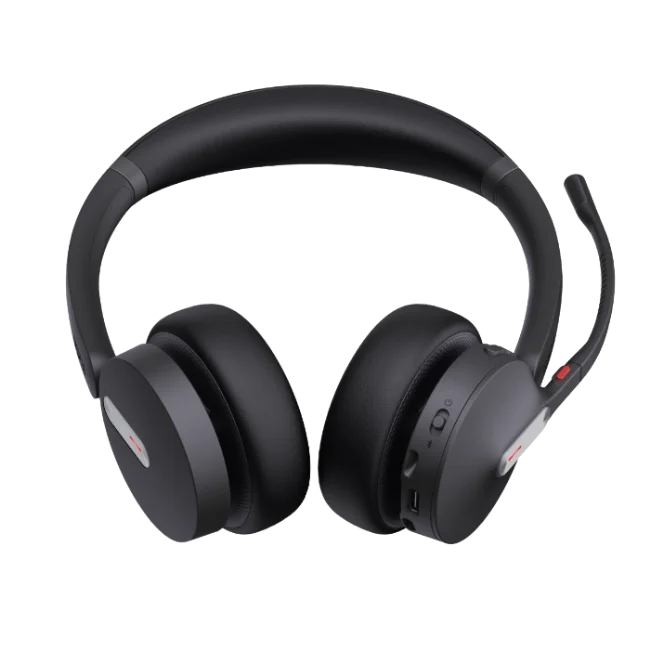
Modern workplaces rely heavily on voice communication, online meetings, customer support, and remote collaboration. As employees move between desks, meeting rooms, home offices, and shared workspaces, having the freedom to communicate without being connected to a desk by a cable can be useful. Wireless headsets provide this flexibility while combining audio communication with hands-free operation.
Different wireless technologies are available for professional users, including Bluetooth and DECT-based solutions. The right option depends on how the headset will be used, what devices need to be connected, and the communication environment. For businesses, factors such as comfort, microphone performance, connectivity, battery life, and compatibility can all influence the choice.
What Are Wireless Headsets?
Wireless Yealink headset are audio devices that connect to computers, phones, or other compatible equipment without requiring a traditional audio cable between the headset and the connected device.
The connection may use Bluetooth, DECT, or another wireless technology depending on the model. This allows users to move within an appropriate operating range while continuing a call or meeting.
Wireless designs are particularly useful for people who spend a significant amount of time communicating throughout the day. Instead of remaining physically connected to a computer or desk phone, users can move around while maintaining communication.
Why Wireless Communication Is Useful in Business
Business communication is no longer limited to traditional office desks. Employees may work from home, use shared workspaces, attend meetings in different rooms, or switch between computers and mobile devices.
Wireless headsets can support these working patterns by providing greater freedom of movement. An employee can answer a call while standing, move around a workspace during a conversation, or step away from a desk without immediately removing the headset.
For customer service teams and call centers, wireless communication can also make certain workflows more flexible. Employees who need to access documents, equipment, or other resources during calls may benefit from not being tied directly to their computer.
Types of Wireless Headsets
Wireless headsets are available in different designs and connectivity options. Understanding the differences can help users select a model that matches their working environment.
Bluetooth Headsets
Bluetooth is widely used for connecting headsets to smartphones, laptops, tablets, and other compatible devices. It can be particularly useful for professionals who regularly switch between personal and business devices.
Some models support connections with multiple devices, allowing users to manage communication across a computer and mobile phone.
DECT Wireless Headsets
DECT technology is commonly associated with professional office communication. These headsets typically use a base station or dedicated wireless system and are designed for users who need reliable communication over a larger workplace area.
DECT models can be suitable for office environments where employees need to move around while remaining connected to a desk phone or computer-based communication system.
Hybrid Wireless Headsets
Some professional headsets combine multiple connection methods. For example, a headset may support DECT for office communication and Bluetooth for mobile devices.
This type of flexibility can be useful for employees who work across different communication platforms throughout the day.
Comfort and Long-Term Use
Comfort is an important consideration when selecting a professional headset. Employees may wear their headsets for several hours during meetings, customer calls, training sessions, or other communication activities.
Headband design, ear cushions, weight, adjustability, and overall fit can influence long-term comfort. A headset that feels comfortable for a short period may not necessarily be suitable for extended daily use.
Different users may also prefer different wearing styles. Mono headsets leave one ear open to the surrounding environment, while stereo designs cover both ears and may provide greater audio immersion.
Businesses should consider the typical workday and communication requirements of employees before selecting a specific headset style.
Microphone Quality and Voice Communication
A headset is not only responsible for delivering sound to the user. Its microphone also plays an important role in communication.
A good microphone should capture the speaker’s voice clearly while reducing unnecessary background noise where possible. This can be particularly valuable in open offices, shared workspaces, call centers, and home environments where background sounds may be present.
Microphone performance can affect meetings, customer service calls, presentations, and internal conversations. Businesses should therefore consider both listening quality and voice transmission when evaluating wireless headsets.
Noise Reduction in Busy Workspaces
Background noise can make communication more difficult. Conversations between nearby employees, office equipment, traffic, and household sounds can interfere with calls and meetings.
Some professional headsets include noise-reduction or noise-canceling technologies designed to improve the communication experience. The effectiveness of these features varies between models and environments.
Users should consider where the headset will be used before choosing a model. A quiet private office may require different noise-management capabilities than a busy call center or shared workspace.
Connectivity and Device Compatibility
Compatibility is another important factor when selecting a wireless headset. A headset may connect to computers, desk phones, smartphones, or communication platforms depending on its design.
Before purchasing, users should check which connection methods are supported by their existing equipment. This can help prevent compatibility problems after the headset is purchased.
Businesses using platforms such as Microsoft Teams, Zoom, or other unified communication systems may also want to check whether a particular headset is designed or certified for their preferred platform. Find Headsets currently lists Yealink wireless models alongside categories for Microsoft Teams, Zoom, office, Bluetooth, and other communication applications.
Battery Life and Charging
Because wireless headsets rely on batteries, battery life can affect their usefulness during a working day.
Employees who spend several hours on calls may require a headset that can support their normal usage without frequent charging. Charging time and charging methods can also influence convenience.
Businesses can consider how employees typically use their headsets. Someone who makes occasional short calls may have different battery requirements from a customer support representative who spends most of the day communicating.
Charging stands can also provide a convenient place to store and recharge certain wireless models when they are not being used.
Wireless Range
Wireless range determines how far a user can move from the connected device or base station while maintaining a connection.
The required range depends on the workplace. A small home office may not require extensive wireless coverage, while a larger office or call center may benefit from greater freedom of movement.
Walls, furniture, electronic equipment, and the specific wireless technology can affect real-world performance. Users should therefore consider their actual working environment rather than relying only on a stated maximum range.
Wireless Headsets for Remote Work
Remote work has changed the way many professionals communicate. Employees may participate in video meetings, customer calls, training sessions, and team discussions from home.
A wireless headset can help create a more flexible home workspace. Users can move away from their desk for short periods while remaining connected, provided they stay within the appropriate wireless range.
For remote workers, comfort and microphone quality can be particularly important because the headset may be used throughout multiple meetings in a single day.
Wireless Headsets for Call Centers
Call centers often involve continuous communication with customers or clients. Employees may spend several hours handling calls while entering information into a computer system.
A wireless headset can provide greater freedom of movement compared with traditional wired models. However, businesses should still evaluate microphone quality, durability, battery performance, compatibility, and comfort before selecting equipment for large teams.
For high-volume environments, consistency is also important. Providing employees with suitable headsets can help create a more standardized communication setup across the workplace.
Managing Multiple Devices
Modern professionals often use more than one communication device. A person may work on a laptop while also carrying a smartphone, for example.
Some wireless headsets support connections to multiple devices, which can make switching between communication sources easier. This feature can be useful for employees who receive both computer-based meeting calls and mobile calls.
However, multi-device functionality varies between models. Users should review the specific connectivity features of a headset rather than assuming every wireless model supports the same setup.
Choosing the Right Wireless Headset
Selecting a wireless headset should begin with identifying the user’s actual communication requirements.
Important considerations may include:
- Wireless technology
- Device compatibility
- Microphone quality
- Audio performance
- Battery life
- Charging options
- Wireless range
- Wearing style
- Comfort
- Noise-management features
- Software or platform compatibility
- Durability
- Budget
For example, a remote worker who mainly uses a laptop may prioritize Bluetooth connectivity and comfort. A call center may place greater importance on microphone quality, battery performance, durability, and easy device management.
Maintenance and Everyday Care
Proper care can help maintain headset performance over time. Users should keep the headset clean, store it safely, and avoid exposing it to unnecessary moisture or extreme temperatures.
Wireless headsets should also be charged according to the manufacturer’s recommendations. If a headset includes replaceable components such as ear cushions, replacing worn parts may help maintain comfort.
When multiple employees share equipment, cleaning and hygiene procedures become even more important.
Final Thoughts
Wireless headsets have become useful communication tools for offices, remote workers, call centers, and professional headsets who regularly participate in online meetings. Their main advantage is the freedom to communicate without remaining physically connected to a computer or phone.
Bluetooth, DECT, and hybrid options provide different approaches to wireless communication, while features such as microphone quality, battery life, wireless range, comfort, and noise management can affect everyday performance.
The best choice depends on the user’s work environment and communication requirements. By evaluating compatibility, connectivity, comfort, and practical usage needs, businesses and professionals can select wireless headsets that support clearer and more flexible communication throughout the working day.