





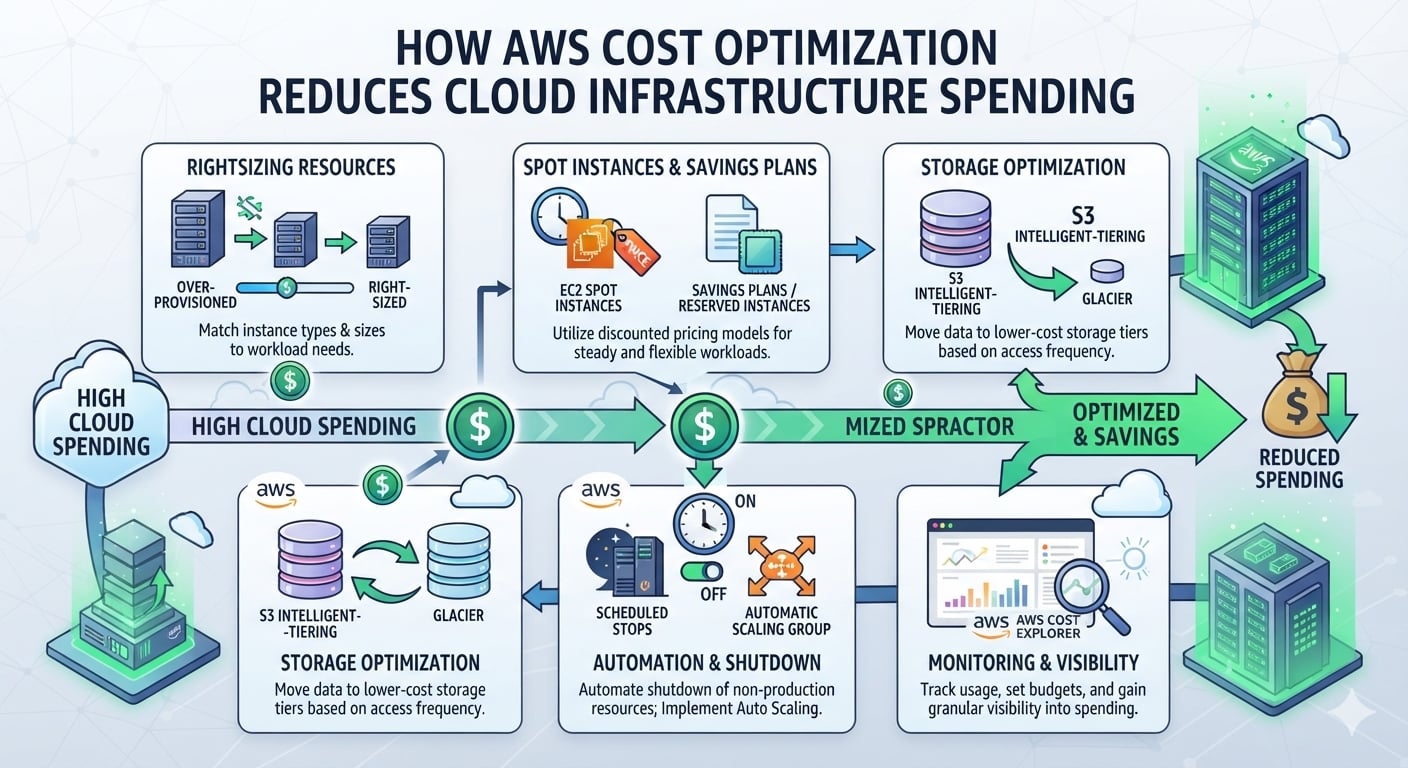
I have seen teams unbox their cloud bill and fall silent. No one expected that. Cloud seems cheap initially, but the cost slowly creeps up every month until suddenly finance starts asking questions. Cost optimisation is the practice of paying for only what you actually use. It is not about making do without things. It is about eliminating waste that no one even knew was there. If you are beginning with an AWS Course Online, this is a subject that needs to be covered right from the start, since it influences everything else that you do. This article will cover where the money leaks out, how to find it, and what simple knobs can reduce the bill.
Why AWS Cloud Infrastructure Costs Increase
The costs don’t just suddenly escalate. Costs meander around. The developer gets done with testing his server for the week, but leaves the server running. Do this for fifty employees, and you get into trouble. Students studying AWS Course in Pune have encountered this issue in practice, with lab instance costs not stopping after the course ended.
Common reasons the bill grows:
- Idle servers that nobody owns
- Oversized machines, picked “just to be safe”
- Old snapshots piling up in the background
- Data leaving the cloud, which gets pricey fast
- No tags, so nobody knows who spent what
How AWS Cost Optimisation Identifies Unused and Underutilised Resources
You cannot reduce what you cannot see. Therefore, the first stage is a search. Scanning systems detect idle resources that use only 3% CPU capacity or storage that is not being used by anything. This is precisely what a student in an AWS Solution Architect Associate Course learns to do.
| Resource | Warning sign | Usual action |
|---|---|---|
| Idle server | CPU under 5% | Stop or delete |
| Unattached disk | No linked server | Snapshot, then delete |
| Old snapshot | Older than a year | Remove |
| Idle load balancer | No requests | Delete |
AWS Cost Reduction with Right-Sizing and Auto-scaling
Right-sizing refers to the process of using machines that match the actual requirements. An easy concept and great savings too. It doesn’t take much time for anyone who is enrolled in the Cloud Computing Course to understand this.
A practical example is one in which a business uses ten machines throughout the day while conducting a sale for only two hours. With the help of auto-scaling, it would use just three servers regularly and ten during the sale period.
| Fixed capacity | Auto scaling | |
|---|---|---|
| Cost | Pays for peak, all day | Pays for actual use |
| Effort | Manual changes | Automatic |
| Risk | Crashes if underbuilt | Adjusts itself |
Using AWS Cost Explorer and Budgets to Track Cloud Spending
AI workload consumption can be rather high. Thus, learners in the AWS Certified AI Practitioner Course should pay attention to costs since the very first day.
With Cost Explorer, a user can see where their money is spent, divided into services, projects, or tags. The Budget feature works as a fire alarm: the user sets his limit (Rs. 500 a month, for instance), and he gets notified when it reaches 80%. No nasty surprises at the end of the month. Truly, it is the best tip that really helps with costs.
How AWS Storage and Pricing Models Can Save on Infrastructural Costs
There is no need to store all your data on premium storage tiers: data that is frequently accessed should stay on faster tiers, but the archive of previous years’ files can be moved to lower-cost options easily.
Just as important are pricing models:
| Option | Best for | Typical saving |
|---|---|---|
| On-demand | Short, unpredictable work | None |
| Reserved commitment | Steady, long-term workloads | Up to about 70% |
| Spare capacity | Jobs that can be interrupted | Up to about 90% |
Conclusion
Reducing costs from clouds tends to be very repetitive. Verify, reduce, repeat. Nevertheless, it’s worth it because you’re seeing results each and every month. It’s easy, and all you have to do is start small, tag resources and schedule an alert, then remove one forgotten server. You’ll see the effect when you receive the next bill.