





Uploading files to a website has become part of everyday digital life. People upload documents to convert formats, images to edit, videos to compress, and PDFs to share. Most of these tasks take only a few clicks, making online tools convenient for students, professionals, businesses, and everyday users.
However, convenience should not mean ignoring security. A file can contain much more information than its visible content. Personal documents may include names, addresses, financial details, business information, or other private data. Once a file leaves your device, how it is handled depends on the website’s security practices and privacy policies.
Before uploading anything, it is worth taking a moment to understand where your file is going and how the website manages it. Here are six important things to consider before sharing files with an online platform.
1. Understand What Information Your File Contains
The first step is knowing exactly what you are uploading. Many people focus on the file’s purpose without considering the information stored inside it.
For example, a PDF might contain a home address, signature, identification number, or financial statement. A Word document could include comments, tracked changes, or hidden metadata that reveals the author’s name. Even an ordinary photograph may contain location information depending on how it was created.
Before uploading a file, open it and review its contents. Check for information that does not need to be shared. Remove unnecessary personal details, comments, and document properties where appropriate.
If a file contains highly confidential information, consider whether an online tool is necessary at all. A trusted offline application may be a better choice.
Understanding your file’s contents is an important first step toward protecting personal documents online.
2. Check the Website’s Privacy Policy Before Uploading
Not every website handles uploaded files in the same way. Some tools process files directly inside your browser, while others transfer them to remote servers for processing.
This is why checking an online converter’s privacy policy matters.
A useful privacy policy should explain what happens after a file is uploaded. Look for clear answers to these questions:
- Does the website store uploaded files?
- Are files automatically deleted after processing?
- Does the service use uploaded content for other purposes?
- Are files shared with third-party providers?
- How does the website protect information during processing?
- Can users request the deletion of stored data?
Pay attention to vague statements. A website that simply says it values user privacy without explaining its actual data-handling practices does not provide much reassurance.
Also, check whether the policy distinguishes between different types of processing. For example, browser-based conversion and server-based video processing may involve different data-handling methods.
A transparent website should make these differences understandable rather than hiding important details in complicated language.
3. Look for HTTPS and Other Website Security Signals
Before selecting an upload button, check whether the website uses HTTPS. You can usually identify it through the padlock symbol and the HTTPS prefix in the browser’s address bar.
HTTPS helps encrypt information transferred between your browser and the website. This makes it more difficult for unauthorized parties to intercept data while it travels across the network.
However, HTTPS alone does not guarantee that a website is trustworthy. It protects the connection, not necessarily the way a website stores, processes, or shares uploaded files.
Consider a few additional security signals:
- Check that the website address is spelled correctly.
- Avoid suspicious links from unexpected emails or advertisements.
- Look for clear contact information and privacy documentation.
- Be cautious of websites displaying excessive pop-ups or misleading download buttons.
- Keep your browser updated to benefit from current security improvements.
A professional-looking design is not proof of security. Focus on the website’s transparency, technical protections, and reputation rather than appearance alone.
4. Follow Essential File Upload Security Tips
Good upload habits can reduce unnecessary exposure of personal information. Even when using a legitimate website, taking a few precautions makes the process safer.
Start by uploading only the file you actually need. If a document contains several pages of sensitive information but you only need to convert one page, consider creating a separate file containing just that page.
You should also consider these practical precautions:
Remove unnecessary metadata: Documents and images can contain hidden information, such as author details, editing history, or location data. Remove sensitive metadata when it is not needed.
Use trusted networks: Avoid uploading confidential documents over unsecured public Wi-Fi. A trusted network is generally a better option.
Avoid suspicious tools: Do not upload private files to websites that display aggressive advertisements, unexpected redirects, or unclear download instructions.
Keep original copies: Save your original files before using an online editing or conversion service. This helps prevent accidental data loss.
Review downloaded files: After processing, check the downloaded file and make sure it is the expected format and content. Avoid opening unexpected executable files.
These simple file upload security tips help create a safer routine without making everyday online tasks unnecessarily complicated.
5. Understand Browser-Based and Server-Based Processing
One important detail many users overlook is where their files are actually processed.
Some online tools use browser-based processing. In this approach, supported operations happen locally on your device rather than requiring the file to be uploaded to a remote server. This can reduce the amount of information sent to an external service.
Other tools use server-based processing. Your file is transferred to the service’s infrastructure, where the conversion or editing takes place before the result is returned.
Neither approach automatically guarantees complete security. Browser-based tools still depend on the website’s code and your browser’s security, while server-based tools require appropriate protections for data transmission, storage, and deletion.
Before choosing a service, understand which processing method it uses for your particular file type.
For example, Easy Converter offers a browser-based workflow for supported image, audio, document, and PDF conversions, while video processing is handled on a secure server. Understanding this distinction helps users make informed decisions about which files they choose to process online.
6. Check File Retention and What Happens After Processing
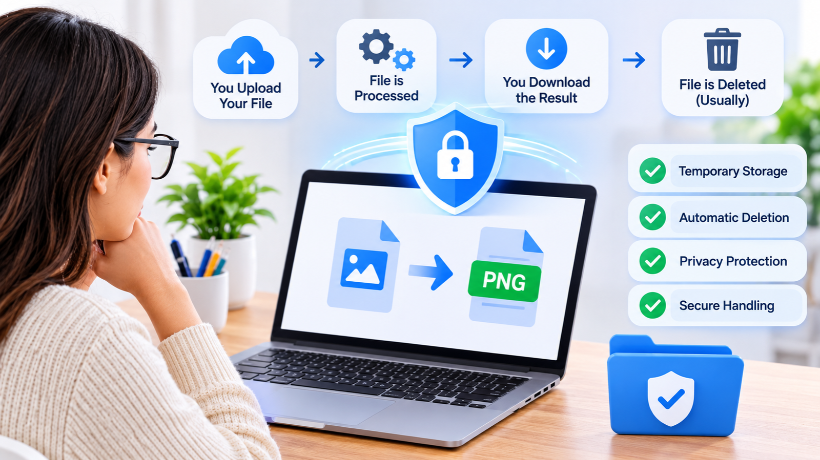
Your responsibility does not necessarily end when the conversion finishes. It is equally important to understand what happens to the uploaded file afterward.
Some websites retain files temporarily to allow users to download their results. Others may keep files longer for operational purposes. The important thing is whether the service clearly explains its retention and deletion practices.
Before uploading, look for information about automatic deletion, storage duration, and whether users can manually remove uploaded content.
After downloading your converted file, check that it opens correctly and contains the information you expected. If the website provides a deletion option, use it when appropriate.
You should also avoid sharing generated download links publicly if they provide access to private documents. A temporary link should not automatically be treated as private unless the service explains how access is restricted.
Developing a habit of checking file retention policies helps reduce the chances of leaving personal information on websites longer than necessary.
Final Thoughts
Uploading files online can make everyday tasks faster and easier, but it is important to understand the privacy and security practices behind the tools you use. Before choosing a website, review the information in your files, read the privacy policy, check for HTTPS, and understand whether processing happens in your browser or on a remote server.
Most importantly, upload only what is necessary and choose services that explain how they handle your data.
Online file conversion should be convenient without requiring users to overlook their privacy. By following these precautions, you can make more informed decisions and handle personal documents more responsibly whenever you use an online tool.