





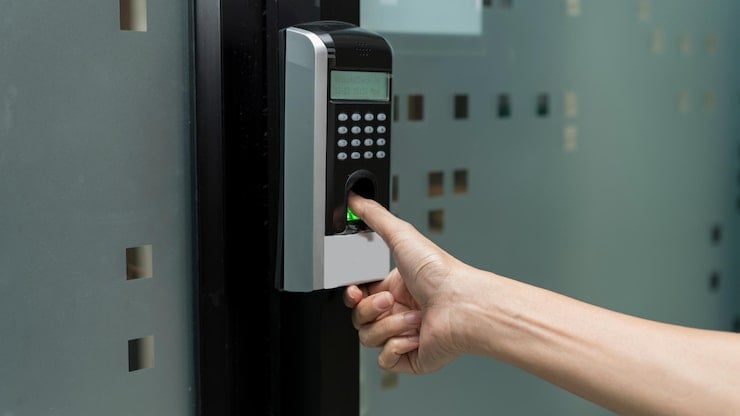
A fingerprint door lock gives offices a fast, keyless way to control who enters and exits. Instead of managing physical keys or access cards, employees use their fingerprint to authenticate. This eliminates unauthorised entry risks, removes the cost of replacing lost keys, and gives facility managers a cleaner way to manage access across multiple doors and staff members.
If you manage an office in Singapore — whether it is a co-working space, a corporate floor, or a small business unit — access control is something you deal with daily. Staff turnover, contractor visits, after-hours access, and lost keys all create friction. A biometric door access system solves most of these problems without adding complexity to your operations.
Here are five practical benefits that make fingerprint door locks the smarter choice for offices.
1. Employees Can Enter Without Keys or Cards
Physical keys and access cards get lost, forgotten, and duplicated. Every time that happens, your front desk or facilities team has to respond. With a fingerprint door lock, your employees carry their credentials on them at all times — literally.
Fingerprint authentication takes under a second. Staff tap the scanner and walk in. There is no fumbling for a lanyard, no waiting for someone to buzz them through. For busy offices where people are coming and going throughout the day, this adds up to a noticeably smoother experience.
It also eliminates the classic problem of tailgating — where an unauthorised person follows an employee through a door. Because each entry requires individual biometric verification, the system naturally enforces one-person-one-entry accountability.
2. Key Management Becomes a Non-Issue
Ask any office manager in Singapore how much time they spend dealing with keys, and the answer is usually more than they would like. Cutting duplicates, tracking who has which key, collecting keys from resigned staff — it is administrative overhead that adds no real value to the business.
Switching to a commercial door lock with biometric capability removes this entirely. There are no physical keys to manage. When a staff member leaves the company, you remove their fingerprint from the system in seconds. No lock replacements. No awkward key collection conversations and No risk that a copy is floating around somewhere you do not know about.
For offices with high staff turnover or frequent contractor access, this alone justifies the investment.
3. Access Control Is Easier to Administer
One of the strongest arguments for an office biometric lock is how much simpler it makes access administration. Most modern fingerprint lock systems come with management software or a mobile app that lets you:
- Add or remove users instantly
- Set time-based access restrictions (e.g., cleaners can only enter between 7am and 9am)
- Monitor entry logs in real time
- Manage multiple doors from a single interface
This level of control is particularly useful for offices with different security zones — such as server rooms, finance departments, or executive areas. You decide who gets access to what, and you can change it at any time without touching a single lock.
For facility managers overseeing several floors or multiple locations, centralised access administration is not just convenient — it is essential.
4. It Reduces Unauthorised Entry and Improves Security Accountability
Unlike a key or a PIN, a fingerprint cannot be shared, guessed, or stolen without the person being physically present. This makes biometric door access significantly harder to bypass than traditional locking methods.
Every entry attempt is logged with a timestamp and a user identity. If something goes missing from a restricted area, or if there is a security incident after hours, you have a precise audit trail to refer to. This is far more reliable than a sign-in sheet or a CCTV camera that shows a face but cannot confirm identity.
In Singapore, businesses handling sensitive data or operating in regulated industries — such as finance, healthcare, or legal services — are increasingly expected to demonstrate physical access controls as part of their data governance obligations. The Personal Data Protection Act (PDPA) encourages organisations to put reasonable security arrangements in place, and documented access control is a strong step in that direction.
5. Long-Term Cost Savings Outweigh the Initial Investment
Fingerprint lock systems have a higher upfront cost compared to a traditional deadbolt and key set. But when you factor in the ongoing costs of key management — lock replacements, duplicate cutting, lost card reissuance, and administrative time — the economics shift quickly.
Consider a mid-sized Singapore office with 40 employees. Over three years, the cost of replacing lost access cards, rekeying locks after staff departures, and managing contractor access can easily run into thousands of dollars. A well-installed biometric access system largely eliminates those recurring expenses.
Most fingerprint locks are also built for durability, with commercial-grade hardware rated for tens of thousands of cycles. The maintenance requirements are minimal, and there are no consumables to replace beyond the occasional battery change.
What to Look for When Choosing a Fingerprint Lock for Your Office
Not all fingerprint locks are equal. Here is what office managers should prioritise when evaluating options:
| Feature | Why It Matters
|
|---|---|
| User capacity | Ensure the system can store enough fingerprint profiles for your team size |
| Audit log storage | Look for systems that store at least 1,000–5,000 entry records |
| Backup access method | PIN or card backup is essential in case of scanner failure |
| Remote management | App or software-based control saves significant administration time |
| Tamper alerts | Important for high-security zones like server rooms or cash-handling areas |
Fire safety compliance is also worth checking. In Singapore, fire exit doors must meet SCDF requirements and cannot be locked in a way that prevents emergency egress. Always verify that your chosen lock is compatible with local fire code standards before installation.
Making the Switch to Biometric Access in Your Office
Transitioning from traditional locks to a fingerprint system does not have to be disruptive. Most installations can be completed outside of business hours, and onboarding staff typically takes just a few minutes per person to enrol their fingerprint profiles.
Start with your highest-traffic or highest-risk entry points — your main office door, server room, or storeroom. Once you experience how much easier access management becomes, expanding the system to other doors is a straightforward decision.
BDETech offers a range of fingerprint door locks suited to commercial and office environments in Singapore, with options that support multi-user management, remote access control, and backup entry methods for peace of mind. Explore the full range at BDETech to find a solution that fits your office setup.
Read more:
Frequently Asked Questions
Can a fingerprint door lock handle a large number of office employees?
Yes. Most commercial fingerprint door locks support anywhere from 100 to over 1,000 user profiles, depending on the model. For larger offices, choose a system with higher user capacity and centralised management software to keep administration efficient.
What happens if an employee’s fingerprint is not recognised?
Most office fingerprint locks include a backup access method such as a PIN code or RFID card. This ensures employees are never locked out due to scanner issues, dirty fingers, or minor skin changes from cuts or dryness.
Is a fingerprint lock more secure than a traditional key lock for offices?
Yes, in most practical scenarios. A fingerprint cannot be duplicated or lent out the way a key or access card can. Every entry is tied to a specific individual, creating an auditable record that traditional locks simply cannot provide.
How do I remove access for a resigned employee?
You simply delete their fingerprint profile from the system via the management software or app. It takes seconds and immediately revokes their access — no lock changes, no key collection, and no security risk from unreturned credentials.
Are fingerprint door locks compliant with Singapore’s PDPA requirements?
Fingerprint locks support PDPA compliance by providing documented physical access controls for areas where personal data is stored or processed. They help businesses demonstrate that reasonable security arrangements are in place, which is a key PDPA obligation for organisations handling personal data.
How long does it take to install a fingerprint door lock in an office?
A single door installation typically takes one to two hours, depending on the existing door hardware and wiring. Most installations can be done outside business hours to avoid disruption, and staff fingerprint enrolment usually takes just a few minutes per person.